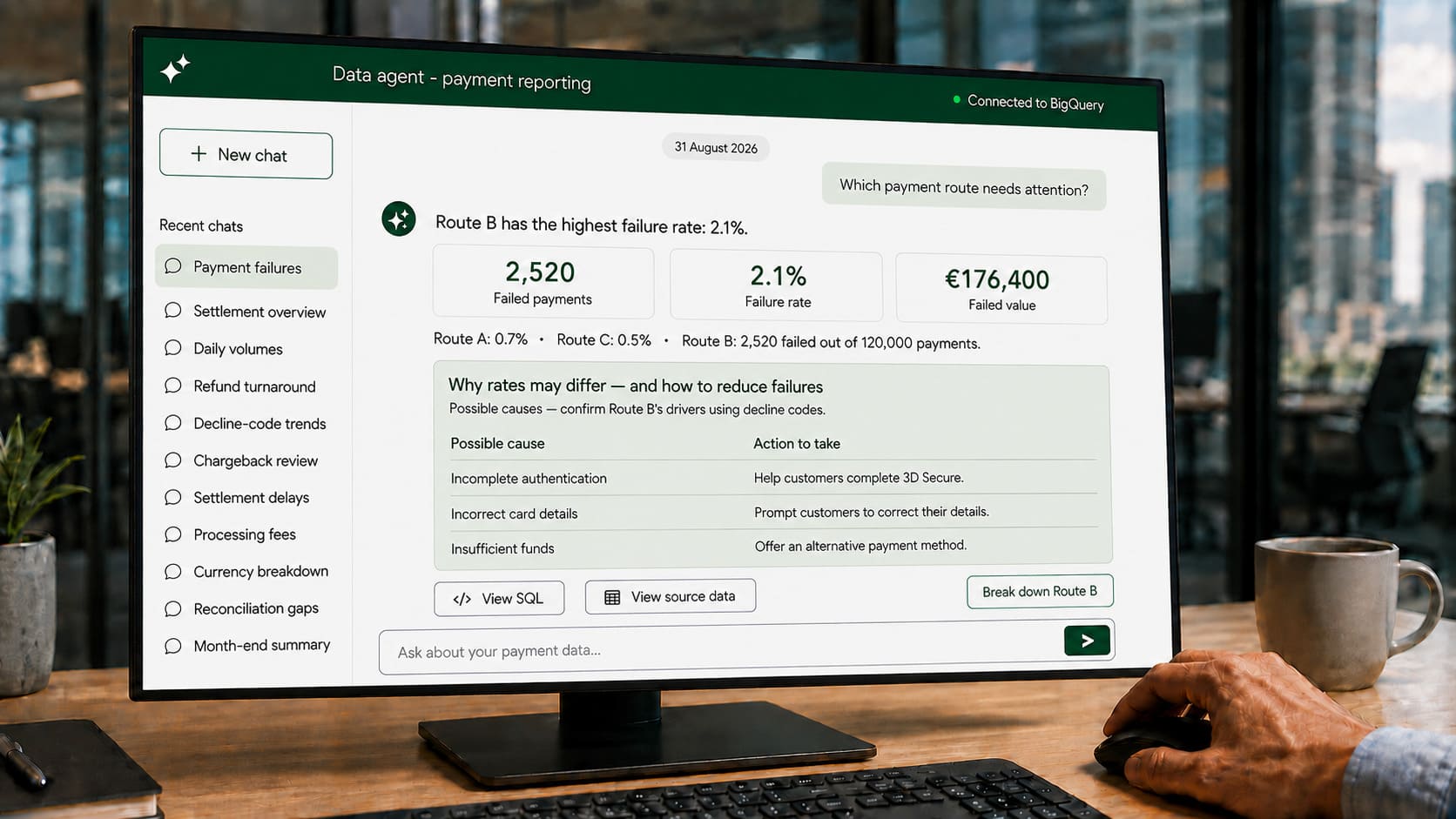
“Could you run that again, but split it by customer type?”
It is a reasonable request. So are the next five. For a data team responsible for quality, governance and platform improvements, the problem is how many still need manual attention.
If your organisation already uses BigQuery, conversational data agents offer a way to let authorised business users explore selected data themselves. Your team defines the sources, business meaning and controls behind the answers.
The prize is useful capacity: fewer repeat requests, quicker investigations and more time for work that needs specialist judgement. That is the case worth testing.
A practical case for data and technology leaders
The person sponsoring an agent may never need help writing SQL. Their concern is whether other people can get reliable answers without creating more work or risk.
- For data and analytics leaders: can repeat questions be answered using agreed definitions, rather than returning to the reporting queue?
- For CIOs and CTOs: can the existing platform deliver more value, with a measurable benefit and a manageable running cost?
- For architects and engineering leads: can the solution fit existing identity, data models and workflows, with queries that can be inspected and tested?
Those questions should shape the pilot before anyone starts designing a chat screen.
What a conversational data agent actually does
Google’s Conversational Analytics in BigQuery supports natural-language questions about selected data sources, with responses that can include explanations and charts.
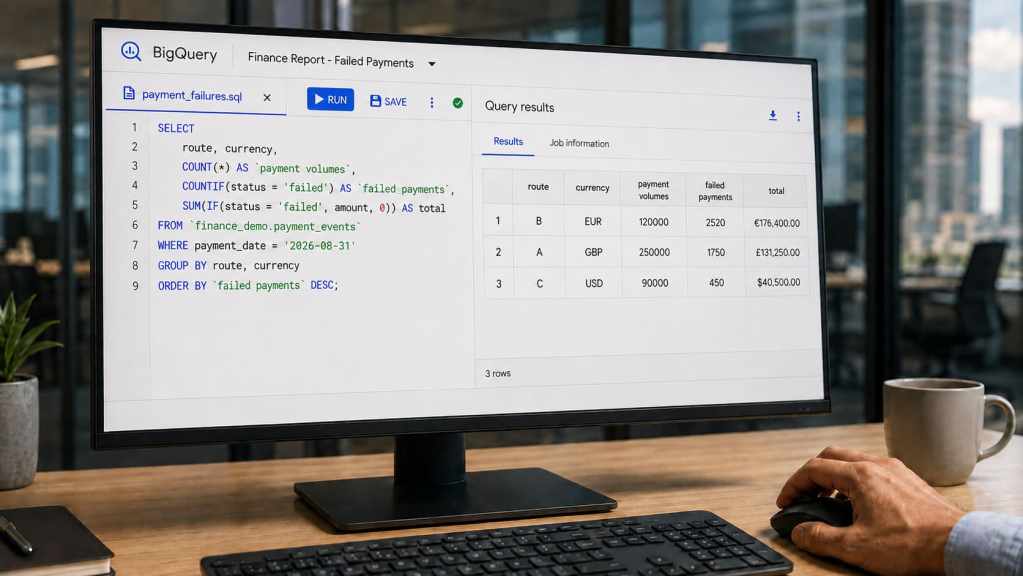
An agent can be configured with business context and verified queries: SQL checked against expected results and used to support particular questions. Google documents these options in its data-agent setup guidance.
Dashboards remain useful for established measures. The agent helps users explore the follow-up questions: another period, a different segment, an exception. It still needs suitable data. A conversational interface cannot fill gaps in a source system or make yesterday’s extract current.
Three places to put it to work
These are illustrative use cases, not claims about any particular organisation’s systems.
Operational performance: investigate the change
A payments team asks: “Where did our payment failure rate increase last week?” Then: “Break it down by processing route and currency, excluding payments that succeeded on retry.”
That last detail matters. Your team needs to define whether failure means an unsuccessful attempt or a payment that ultimately failed. The answer should show counts, comparison periods and filters, giving operations a starting point for investigation rather than an unsupported explanation of the cause.
The same approach can support questions about application delays, claims backlogs or service queues. The benefit to the data team is making those follow-ups repeatable without manually rebuilding each query.
Investment and data businesses: investigate the inputs
For investment, risk-analytics and market-data teams, a useful question might be: “Which reporting runs used inputs that arrived after the agreed cut-off?”
Follow-ups could isolate the affected feeds, portfolios or reporting dates. This needs timestamps, lineage or exception records available to query; the agent cannot infer missing evidence.
The value is quicker investigation of data freshness, completeness and reconciliation issues. Existing validation and approval processes remain in place. The agent supports analysis; it does not approve a risk calculation or investment decision.
Financial software providers: separate two opportunities
An internal product or service team might ask: “Which customer groups generated more support requests after the latest release, and which features were they using?”
With suitable usage and support data, an agent could help explore the pattern without adding another reporting task to the engineering backlog. A relationship in the data is a lead to investigate, not proof that the release caused the issue.
Embedding analytics in a customer-facing product is a separate proposition. It needs explicit tenant isolation, customer entitlements and decisions about which data and functions clients can access. It should be scoped and tested separately from an internal assistant.
Make the controls part of the product
Start with approved views, agreed measures and a defined audience. For architects, the implementation questions are concrete: which identity executes queries, how access is enforced, where users interact with the agent and how query costs are limited.
Test representative questions against analyst-checked answers. Include missing data, ambiguous wording and requests outside the user’s permissions. A plausible answer to a question the system should reject is a failed test.
Google’s native feature restricts access to selected sources the user is permitted to query and does not perform write operations. Those native safeguards do not remove the need to design access correctly in a custom application.
Review processing locations, sensitive prompts and audit evidence too. Google’s security and privacy guidance notes that Cloud Logging audit logs are not available for Gemini in BigQuery prompts and responses. Do not assume query records alone provide a complete conversation audit trail.
Where Maverick fit
Google provides the underlying capability. The work is deciding where it belongs, preparing it for your business and proving that it helps.
Working with our partners Aliz, Maverick’s focus is a scoped implementation alongside your data and engineering teams: selecting a worthwhile use case, preparing data and definitions, testing the answers, and fitting the interface into the way people work.
That may mean extending an existing capability rather than commissioning a new platform. For a software provider with its own engineers, it may mean focused design and validation support. The scope should reflect what your team already has.
Start with the requests that keep coming back
A useful pilot should leave you with a tested question set, agreed definitions, a working agent and a clear view of the integration and operating costs.
Measure time to a usable answer, accuracy, analyst correction effort and repeat use. If checking the output consumes the time saved, the case is not proven. If the results hold up, you have evidence for a wider rollout.
Which recurring business questions keep landing with your data team? Bring us one example. We can help assess whether a focused BigQuery pilot could take some of that work out of the queue.